Linux that doesn't break.
Nyra OS is built from years of Linux going wrong: updates that broke the bootloader, lost files, laptops that died overnight, fixes that only worked in a terminal. It's a Linux for everyone, not just developers. One you can rely on.
You can't download Nyra OS yet. We're at the planning and design stage. Every screen on this page comes from the interactive prototype.
No black screen, no rescue USB, no forum threads. Your files never move, because the system and your data are kept apart.
We've been there.
Every crossed-out line happened to us. Nyra is the list of fixes.
Linux is great until it isn't. Most distributions are made by and for people who enjoy fixing things. Nyra is for everyone else: people who want their computer to start, update and keep working.
Six things we do differently
Not brochure features. Each one comes from a problem we hit ourselves.
Every update can be undone
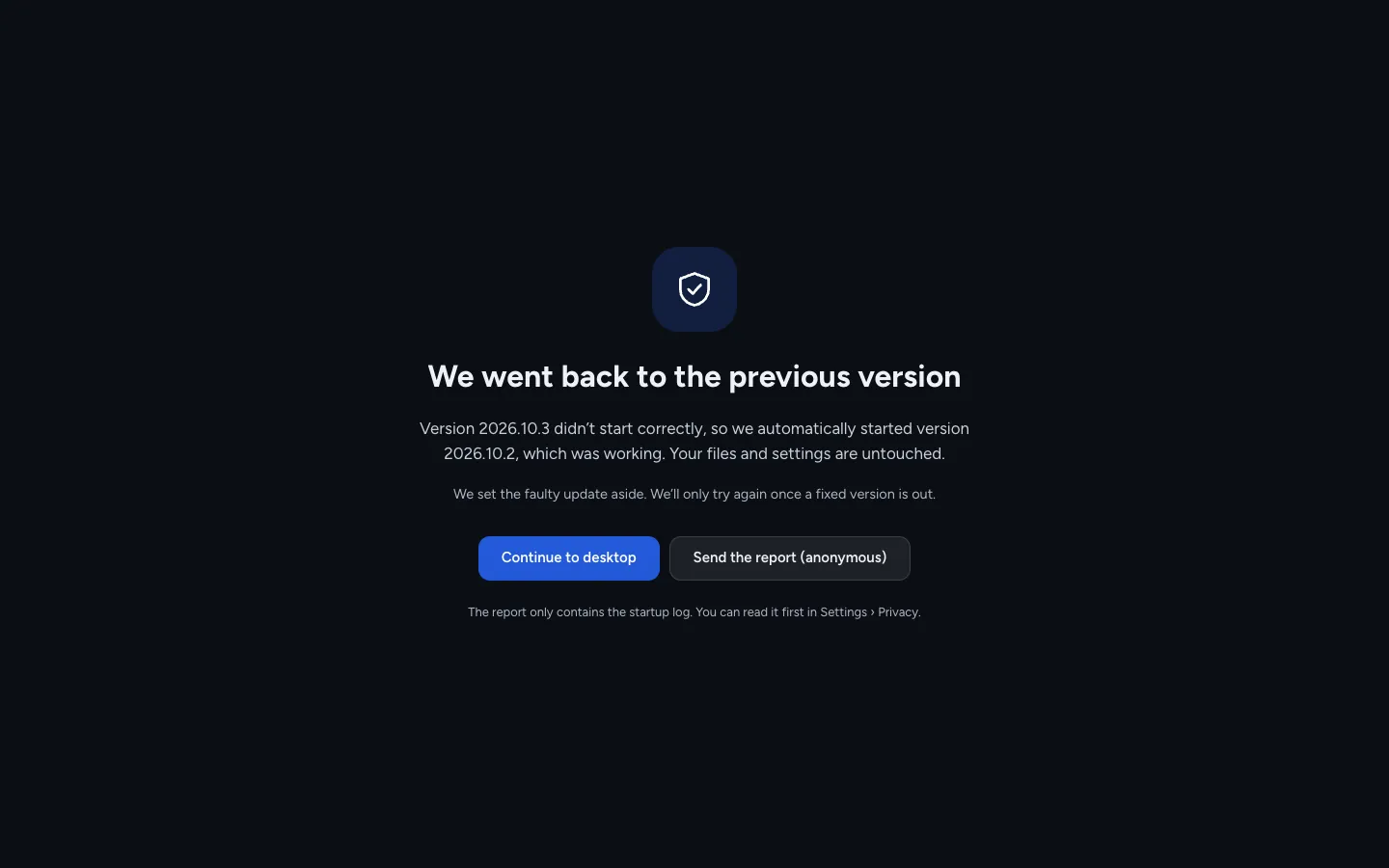
The system is one signed image, the same one we tested, bit for bit. A new version installs next to the current one and takes over at the next restart. If it doesn't start, the computer goes back on its own. Previous versions stay in the boot menu, and so does Windows, if you keep it.
bootc · atomic updates · boot counting · signed imagesCheck your laptop before you install
Start Nyra from the USB stick and run the laptop check: Wi-Fi, sound, microphone, camera, fingerprint, graphics and three sleep cycles. You get a report for your exact model: what works, what doesn't yet, and what we fixed automatically. Then you decide.
live session · nothing is installed or changedFixes for your laptop, applied for you
Most laptop problems on Linux are specific to a model: battery drain in sleep, an NVIDIA card that never powers down, thin-sounding speakers, cameras that need special support. Nyra recognises the model and applies the known fixes, including speaker tuning like on Windows. Settings shows what drains the battery and why the laptop woke up.
per-model fixes · tested on reference laptopsOne library for every game store
Steam, Epic, GOG, EA, Ubisoft, Battle.net and Rockstar games in one place, each started with the Proton version known to work for it. The same library turns into a controller interface for handhelds, and a TV mode for films, photos and streaming.
umu-launcher · Proton · gamescope · Handheld DaemonYour habits come with you
Before you install, a small Windows app checks your PC and every program you use, makes sure your BitLocker key is saved, and packs your files, Wi-Fi networks and browser data for the move. On first start, Nyra recognises the programs you had on Windows and suggests what to use for each, installing them in the background. Pick a Windows, macOS or balanced layout; Windows shortcuts work too.
A promise you can hold us to
"It doesn't break" is easy to say. So we put it in writing, and we publish the data that shows whether it's true, from computers whose owners chose to share it anonymously.
opt-in, anonymous reports · published monthlyOne library. Three ways to play.
The same games and films at the desk, in your hands and on the TV. The interface changes to fit; your library and your saves come with you.
And everything you'd expect
None of this is new. It's just done carefully, in one consistent design.
App store
Apps from Flathub, with reviews and the permissions each one asks for. Search works with Windows names, so "photoshop" finds GIMP and Krita.
Browser
Based on Chromium, so your extensions work, with tracker blocking and import from Chrome or Edge.
Notes
Simple notes with folders, checklists and search. They're plain Markdown files in Documents, so they open anywhere and get backed up like everything else.
Photos
A simple editor with filters, cropping and portrait-style background blur. Select text in any photo or screenshot and copy it, all on your computer.
Phone
Messages, calls, notifications and recent photos from your phone, on the computer. Codes from texts get a copy button.
Quick share
Send files to any phone or computer nearby, without a cable or an account. Works with the LocalSend app on Android, iPhone, Windows and Mac, because it's built on LocalSend's open protocol. Credit to the LocalSend team.
- A modern office suite
- Merge, split and sign PDFs
- Scan to a searchable PDF
- Mic noise removal and background blur in calls
- Bluetooth headsets that sound good in calls
- Your Android phone as a webcam
- Live captions for any audio
Moving from Windows
A small Windows app checks your PC and programs, makes sure your BitLocker key is saved, backs up your files and makes the USB stick.
First start
Language, network, account, your files from Windows, and the programs you used there with a suggestion for each. Signed in with Wagg Cloud? Your previous setup comes back automatically.
Task Manager
Ctrl+Shift+Esc or right-click the taskbar, like on Windows. See what slows the PC down, close apps that froze, choose what starts with it.
- Win+P for monitors and projectors
- Per-app volume mixer
- Gestures like on a Mac, tablet mode and pen
- ID cards and e-signatures, per country
Game bar
Win+G over any game: FPS, temperatures, game and chat volume, and a button that saves the last 30 seconds.
Video editor
For quick edits, like Clipchamp or CapCut: titles, music, transitions, automatic subtitles and export for YouTube or TikTok.
Terminal and containers
For developers: apt or pacman inside containers, Docker and VS Code in the Developer edition. The base system stays clean.
- Screen recording
- Focus modes on a schedule
Family
Accounts for children with screen time, age ratings, website filters and requests you approve with one click.
Security
Firewall profiles per network, scanning for Windows programs and downloads, quarantine, and a check that the system is the one we signed.
Simple mode
Big text and buttons, only the essential apps, and "Ask for help" always visible. For parents, grandparents or anyone who wants less.
- See which app uses your mic or camera
- Accessibility and offline dictation
- An encrypted disk that unlocks on its own, with a recovery key so you're never locked out
- Unknown USB sticks can't run programs until you trust them
- No all-powerful admin access by default, and a developer mode when you need it
Help and repair
Pick what isn't working and Nyra checks the usual causes, then fixes it with one click. Or give a friend a code so they can see your screen.
Backups and vault
Hourly snapshots plus encrypted copies to a disk, a NAS or Wagg Cloud. A vault folder with its own password for sensitive papers.
Online accounts
OneDrive, Google Drive, Dropbox and Nextcloud in the file manager, with files on demand and offline folders.
- Disk health warnings
- Roll back any app to its previous version
- Go back to yesterday's settings from the boot menu
- Reset your PC, keeping your files
- Recover a forgotten password without losing files
- Free up space in one click
- Ask a friend for help with a 6-digit code
What won't work
We'd rather tell you now than have you find out after installing.
Some online games
Anti-cheat systems in games like Valorant, Fortnite or FiveM block Linux. That's up to the publishers, not something we can fix. The Games app tells you before you buy.
Netflix and other DRM services in 4K
On Linux they play at around 720p in the browser, without HDR, and Nyra's browser sharpens them for big screens. YouTube and your own files play at full quality.
Some fingerprint readers and cameras
A few models aren't supported by Linux yet. The laptop check tells you before you install.
Some official forms and programs
ID cards and e-signatures work where the country publishes Linux software. For forms that need Adobe Reader, like Romania's ANAF PDFs, we're preparing a one-click Adobe Reader setup through Windows compatibility, tested on real forms. Settings shows what works in your country.
Some Windows-only software
Specialised programs, like some accounting or industrial software, have no Linux version. The Windows app tells you before you switch, and keeping Windows next to Nyra stays an option.
It isn't ready
You can't install Nyra OS yet. The foundation works: a signed image that boots, updates and rolls back on its own, tested every night. The first test version comes after phase 1.
Proven parts, put together carefully
System images built from Debian, updated atomically, with core parts rewritten in Rust where it's worth it.
Extended with our own plugins, not rewritten.
Your apps, isolated from the system.
Settings, store, games, setup, system services.
The right Proton version per game, picked for you.
Files, settings and game saves, synced.
Picked by testing real Word and Excel files, not by taste.
The engine behind Kdenlive and Shotcut.
One sync engine for every cloud account.
Reliability first, then everything else
Ten phases, each with a clear definition of done.
- DonePlanning and designArchitecture, decisions, interactive prototype, name and logo.
- Phase 0 · in progressFoundationA signed image that boots, updates and rolls back. It works and is tested every night; now come disk encryption and the last tests.
- Phase 1Base imageFull Plasma desktop, codecs, Steam, NVIDIA, installer.
- Phase 2The Nyra desktopThree layouts, Start, search, control center.
- Phase 3Our appsSettings, updates, backups, store, security, notes, photos, first start.
- Phase 4Games, handheld, cinema, videoOne library, controller and TV interfaces, the video editor.
- Phases 5–6Cloud and developersWagg Cloud sync, Developer edition.
- Phases 7–9Installer, browser, betaDual boot, the Windows moving app, laptop check, our browser, public beta.
Hear when the alpha opens
One email when there's something to try. If you want, become a tester: short missions on your own computer that make Nyra work better on your model.
You're probably wondering
Short answers to what people ask first.
When can I download it?
Not yet. The first test version comes after phase 1, the public beta after phase 9.
Can I keep Windows?
Yes. Dual boot is supported: Nyra gets its own boot partition so Windows updates can't break it, and you can restart straight into Windows from the power menu.
Will my games work?
Most Windows games run through Proton. A few online games block Linux with anti-cheat, and the Games app says so upfront.
Do I need the terminal?
No, not for anything in normal use. It's there if you want it.
How long will my computer get updates?
At least five years for any PC that meets the requirements when Nyra 1.0 comes out. The system updates continuously, so there's no version that expires.
Will my Word files and cloud drives work?
Office files open in a modern office suite, with fonts that match Microsoft's so layouts don't shift. OneDrive, Google Drive, Dropbox and Nextcloud are built into the file manager.
What happens if I reinstall?
Sign in with Wagg Cloud on first start and your settings, apps, Wi-Fi networks and app settings come back on their own. Passwords and keys are encrypted on your computer before they leave it. Without an account, you can save the same backup to a USB drive.
Is it free?
Yes. Nyra OS is free to download and use. Its core is open source (the base image, the update system, the desktop integration), so anyone can check what runs on their computer. The project is led and maintained by Wagg.
How can I help?
When the alpha opens, sign up as a tester: you get short missions on your own computer, like leaving the laptop asleep overnight or connecting a monitor, and the results improve support for your model. The base is already open source: github.com/NyraOS/nyra-base, with the rules for contributors.